Revit MEP Agent
The Revit MEP Agent is a local event-driven system I built to bridge Revit and external computation layers.
It’s not a chatbot or automation script — it’s a deterministic agent that observes, interprets, and reacts to model data in real time across multiple MEP disciplines.
Overview
The goal was to move beyond one-off automations and instead create a framework that could:
- Monitor model state changes
- Exchange structured data (DTOs) with a backend (This allows for information to be passed cleanly between Revit and other systems and isn’t exposed to the LLM directly)
- Run heavy logic outside of Revit (Rust or Python)
- Log and test everything deterministically
This became a foundation for how I approach automation across mechanical, electrical, and plumbing workflows.
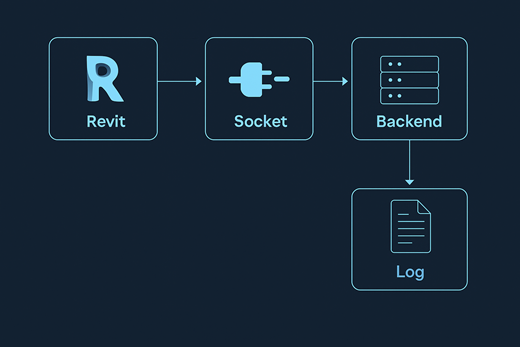
Core Features
User-Driven Agent
The agent is built around an event loop that listens for user actions and model changes.
When triggered, it packages up relevant data into DTOs and sends them to a backend service for processing.
Data Transfer Objects (DTOs)
All communication uses DTOs to serialize and deserialize model data cleanly.
Each DTO defines exactly what data a command expects and returns.
Example:
ElementDataDto— geometry and parameter metadataCommandRequestDto— structured command sent to the agentCommandResponseDto— deterministic result returned to Revit
public class ElementDataDto
{
    public int ElementId { get; set; }
    public string Category { get; set; }
    public Dictionary<string, string> Parameters { get; set; }
    public GeometryDataDto Geometry { get; set; }
}

public class CommandRequestDto
{
    public string CommandType { get; set; }
    public List<ElementDataDto> Elements { get; set; }
}
Custom Logging
Every part of the system uses a shared logging utility.
The logger is lightweight, file-based, and consistent. So, whether a function is running inside Revit or on the server, or in the router, all logs align.
It includes:
- Function tracing
- Timestamped output
- Log rotation
- A Revit button that opens the active log instantly
[2024-10-25 14:32:10] [INFO] CommandRequestDto received with 5 elements.
[2024-10-25 14:32:11] [DEBUG-REVIT] Processing ElementId 12345: Category=Air Terminal
[2024-10-25 14:32:12] [ERROR-REVIT] Parameter "Flow" missing on ElementId 12346
Fake Server for Testing
I built a mock Revit Agent server in Jupyter Notebook to test DTOs, socket behavior, handlers, and error handling inside of Revi0t.
This fake server can send simulated JSON commands. Perfect for debugging without needing a live connection to Claud.
# mcp_server.py
import socket
import threading

HOST = "127.0.0.1"
PORT = 5577

def input_loop(conn):
    """Background thread to type messages to send to Revit."""
    try:
        while True:
            msg = input("Enter JSON to send to Revit (or 'quit' to stop): ")
            if msg.strip().lower() in {"quit", "exit"}:
                break
            if not msg.endswith("\n"):
                msg += "\n"
            conn.sendall(msg.encode("utf-8"))
    except Exception as e:
        print("Input loop ended:", e)

# Main server loop
while True:
    with socket.socket(socket.AF_INET, socket.SOCK_STREAM) as s:
        s.setsockopt(socket.SOL_SOCKET, socket.SO_REUSEADDR, 1)
        s.bind((HOST, PORT))
        s.listen(1)
        print(f"Listening on {HOST}:{PORT} ...")
        conn, addr = s.accept()
        with conn:
            print("Connected by", addr)

            # Send something to Revit
            conn.sendall(b'{"type":"hello","from":"python"}\n')

            # Start a thread. Can type into the console and send messages to Revit
            threading.Thread(target=input_loop, args=(conn,), daemon=True).start()

            buf = b""
            while True:
                try:
                    data = conn.recv(4096)
                    if not data:
                        print("Client closed.")
                        break
                    buf += data
                    while b"\n" in buf:
                        line, buf = buf.split(b"\n", 1)
                        txt = line.decode("utf-8", errors="replace")
                        print("Got from Revit:", txt, flush=True)
                        # Respond automatically with a pong
                        conn.sendall(b'{"type":"info","msg":"pong from python"}\n')
                except ConnectionResetError as e:
                    print("Connection reset:", e)
                    break
Shared Utilities
The agent ties into a growing library of cross-discipline utilities:
- Parameter helpers (get/set with type safety)
- Smart tagging system for clean tag placement (N, S, E, W)
- Linked element utilities for view templates and references
Each module can run standalone or plug into the agent, giving flexibility for future projects.
MEP Integration
The Revit MEP Agent is modular across disciplines:
- Mechanical: air terminal and duct validation
- Electrical: circuit and load analysis
- Plumbing: slope and connector consistency checks
- Architectural: basic link coordination
Each runs through the same DTO and logging backbone, allowing consistent metrics and testable results.
Why It Matters
This project represents how I think about AEC automation — not as a bunch of scripts, but as a system that captures reasoning and relationships.
Every component — from DTOs to the fake server — was built to make logic testable, transparent, and extendable.
It’s a foundation for future agent-based work, where Revit isn’t just a modeler but an intelligent, observable system.
Tech Stack:
C#, Python 3, SQLite, Socket, Jupyter Notebook